
Online Safety for Seniors: Common AI Scams and How to Protect Against Them
AI (Artificial Intelligence) is a type of computer program that learns from the information it’s given so it can recognize patterns, make decisions, and improve over time. It learns in a way that’s loosely similar to how people learn. For example, if you show it many pictures of dogs and cats, it eventually figures out what makes each one different and becomes very good at telling them apart. AI can learn from all kinds of information — text, photos, videos, and even sound.
At Senior Tech Connect, we believe technology should empower you, not intimidate you. Here’s what you need to know.
1. AI-powered “Pig Butchering” Relationship Scams
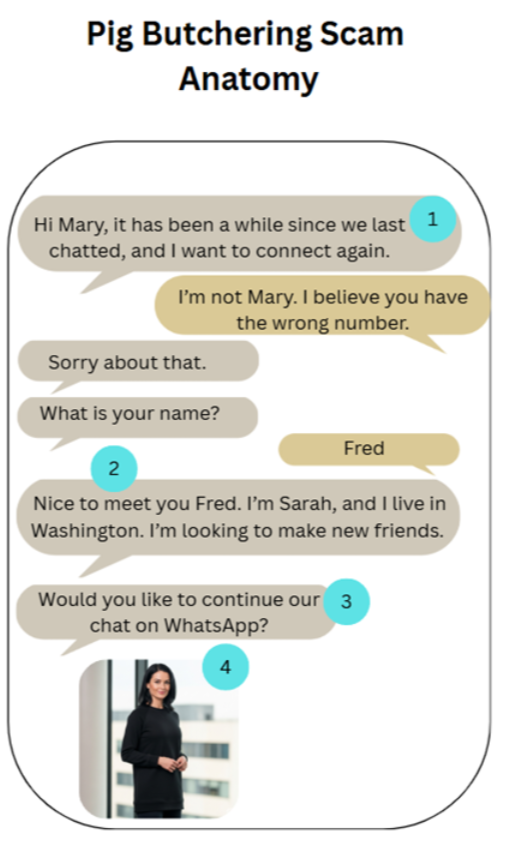
In this scam, the scammer tries to build a relationship with their targets, usually done on social media such as Instagram, WhatsApp, or X (previously known as Twitter). When they believe they have built a strong enough relationship with you, they will ask something from you, such as money or personal information while pretending to have good intentions.
Typical signs of a pig‑butchering scam:
Receive a text from someone you don’t know
Tries to build a relationship with you
Asks you to chat more on a different messaging platform
Sends you an image created using AI
2. AI-Enhanced Phishing Emails
Phishing scams are emails designed to trick you into giving away personal information or clicking harmful links. Scammers often pretend to be a company or person you already know. With AI, these emails are becoming more convincing because AI can:
Remove spelling and grammar mistakes
Include personal details, like your name or address
Copy the writing style and formatting of real companies
Create a sense of urgency so you feel pressured to act quickly

3. AI Voice Cloning Scams
Scammers can now use AI to create a voice that sounds like someone you know — sometimes using only a short audio clip. They may pretend to be a family member or friend and ask for money or personal information.
Red flags:
The caller sounds like someone you know but is unusually frantic
They pressure you to act immediately
They use personal details to make the call feel real
Something about the situation feels “off,” even if the voice sounds familiar
Always hang up and call the real person back using a known number.

How to Protect Yourself from AI Scams
Here are simple, effective habits that can keep you safe:
1. Look closely at photos
AI‑generated images can look real at first glance. Check for:
Strange backgrounds
Blurry hands or jewelry
Odd lighting or shadows
2. Slow down when something feels urgent
Scammers rely on panic. Take a moment to think or talk to someone you trust.
3. Hover over links before clicking
On a computer, hover your mouse over a link before clicking it to see where it actually leads.
4. Talk to your family
Scammers often target multiple people in the same family. Sharing information protects everyone.
5. Report scams
If you think you’ve been targeted:
Tell your bank immediately
Inform local authorities
Report it at reportfraud.ftc.gov
Reporting helps protect others in your community.
Authored by Omaed Noorzay
Want more easy tech tips? Visit our YouTube channel.
New to QR codes or just need a quick refresher? This short video walks you through the simplest way to scan a QR code using your smartphone. Perfect for beginners, seniors, or anyone who wants to feel more confident with everyday tech.
Watch the step‑by‑step demo, try it yourself, and subscribe to our YouTube channel for more easy tech tips designed to help you stay connected and independent.